
Your demo is tomorrow. The environment works, the deck looks clean, and your account executive wants you to add another workflow. You're still missing something more important: agreement on what the buyer needs to decide after seeing it.
That's where learning how to give a killer presentation starts for a Solution Engineer (SE). Your job isn't to deliver an impressive product tour. It's to help the buyer evaluate fit, understand the remaining risk, and commit to a useful next step.
Why Most SE Presentations Lose the Technical Win
Consider a hypothetical deal. You deliver a polished demo, work through every screen without trouble, and answer the integration questions. The audience nods. Your account executive sends a follow-up, and the buyer replies that they need to discuss internally.
Nothing obviously went wrong. But nobody agreed on what the presentation was supposed to prove.
The operations leader wanted evidence that the proposed workflow would remove a manual handoff. Security wanted to understand access boundaries. The executive sponsor wanted to know whether the implementation effort was justified. You showed features relevant to all of them without resolving the question any of them owned.
Diagnose the missing decision
Treat the technical win as buyer-confirmed agreement that your proposed solution meets the requirements that matter, with an acceptable path through outstanding risks. Your confidence in the product isn't that agreement.
Before building the presentation, distinguish what you know from what you've assumed:
| Discovery input | What you need before presenting |
|---|---|
| Customer problem | A specific workflow, constraint, or failure the buyer recognizes |
| Evaluation criteria | What the buyer will accept as evidence of fit |
| Stakeholder concerns | Who needs proof, reassurance, or a different discussion |
| Decision process | What can happen after the meeting and who must participate |
If those inputs are missing, use your next conversation for structured discovery, not a broader demo. No discovery, no demo means you don't substitute product coverage for customer understanding.
Continue discovery while presenting
Even a well-qualified presentation needs room for correction. State your understanding of the problem and ask whether anything has changed before you start proving a solution.
In the hypothetical deal, you might open by confirming that the manual handoff is the evaluation priority. If the operations leader says the concern is exception handling, change the route. Don't finish the prepared workflow because you rehearsed it.
A nod tells you the buyer is following. It doesn't tell you the buyer agrees that you've proved fit.
Presentation quality still matters. Confusing explanations can undermine sound technical work. But polish can't repair an evaluation built around the wrong problem.
Use the technical win rate as your north star, rather than treating compliments about the demo as an outcome. Your presentation should make the buyer's next decision clearer and the unresolved work explicit.
Designing Slides That Support the Spoken Message
I've watched a technically sound evaluation stall because the buyer's architect spent four minutes reading a dense diagram while the SE kept talking. Slides should carry evidence, not your transcript. If buyers are reading paragraphs while you explain an architecture, you've given them competing tasks.
Savoy, Proctor, and Salvendy found in a 2009 study of 62 students that participants retained 15% less verbally delivered information in PowerPoint-supported lectures, an instructional finding rather than a sales-conversion benchmark (study indexed by ERIC). Treat it as a warning about split attention, not a prediction about your win rate. Buyers can prefer a slide format and still understand less of what you said.
Build around a claim
Replace topic headings such as "Workflow Architecture" with a buyer-relevant assertion you can demonstrate. "Exceptions reach an owner before processing resumes" gives the room something to evaluate; a label gives them nothing.
Then build the slide around the explanation:
- Assert the point. State what the buyer should conclude, without overstating the evidence.
- Show the proof. Display the workflow, product view, or comparison that supports it.
- Reveal relationships. Add diagram elements as your narration reaches them.
- Explain the implication. Connect the evidence to the evaluation criterion and check whether it answers the concern.
This sequence keeps what buyers see synchronized with what they hear.
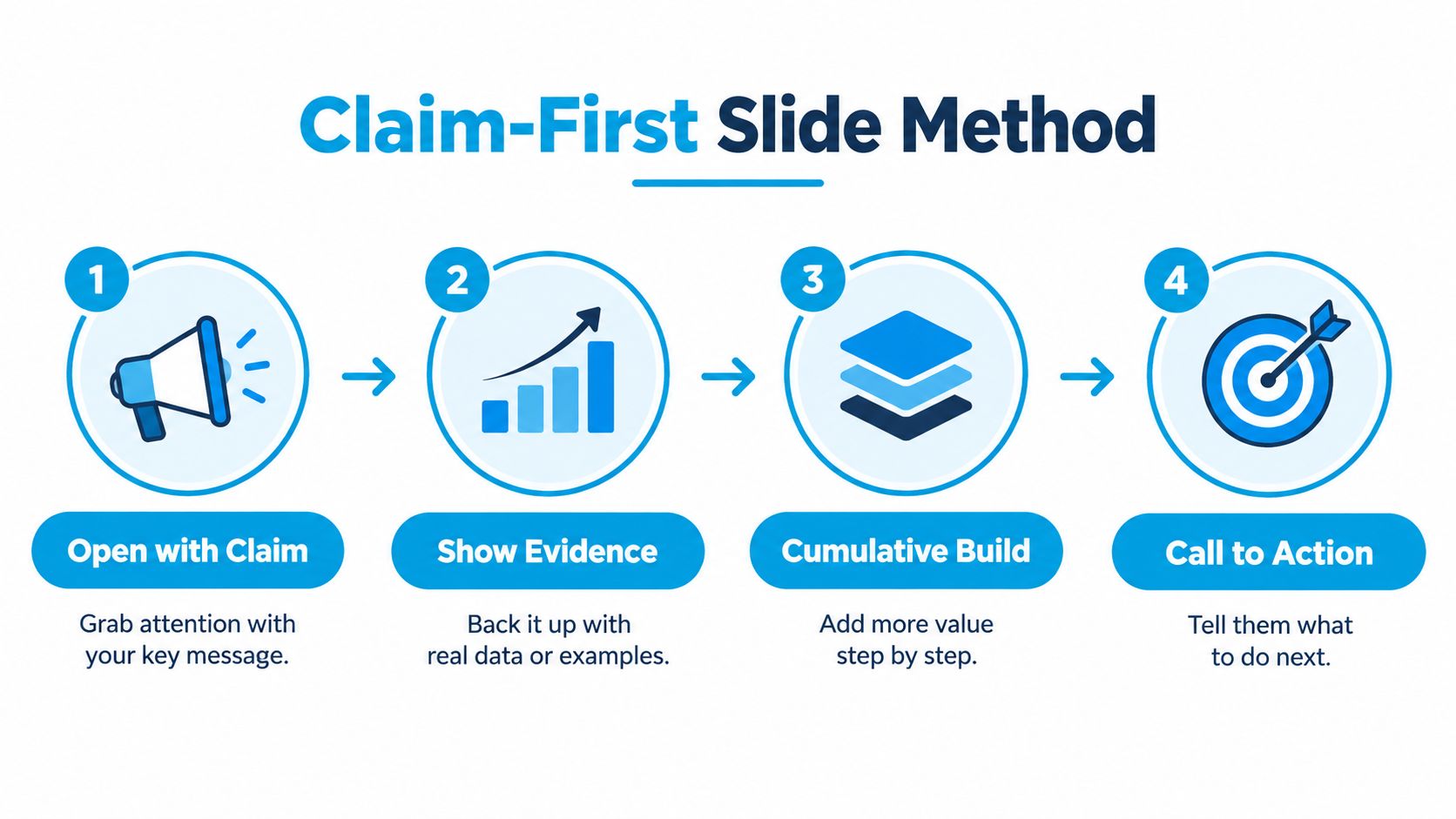
A cumulative build earns its place when it clarifies a dependency. When it only makes boxes appear dramatically, cut it. Keep a complete reference version available for the technical deep-dive afterward, since the detail-oriented stakeholder will ask for it.
Set an evidence-density budget
Start with one message, no more than three bullets, and roughly 20 words when bullets are necessary as a working constraint rather than a universal law; the presentation guidance discussing Baylor's threshold supports limiting competing text on screen.
For typography, Metropolitan State University of Denver recommends a practical minimum of 28-point text. If your architecture labels won't fit legibly, split the view into two slides instead of shrinking everything until the back row squints.
Use familiar sans-serif fonts such as Arial or Calibri, strong contrast, and labels or shapes alongside color distinctions, consistent with Microsoft's accessible PowerPoint guidance.
For the final review, run the five-second takeaway check described in the Baylor guidance cited above: briefly expose the slide, then ask a colleague what it means. If they hesitate or guess wrong, simplify the slide instead of planning to explain harder in the room.
If stakeholders are debating deck size, LiveDocument's pitch deck length tips offer a useful planning resource. Hold yourself to a stricter criterion: every main-deck slide must help resolve a buyer question, and anything that only demonstrates thoroughness belongs in the appendix.
Building the Narrative Arc for a Technical Audience
Start with the decision path, not the product navigation. Your application menu reflects how someone organized the software. It doesn't necessarily reflect how a buyer evaluates change.
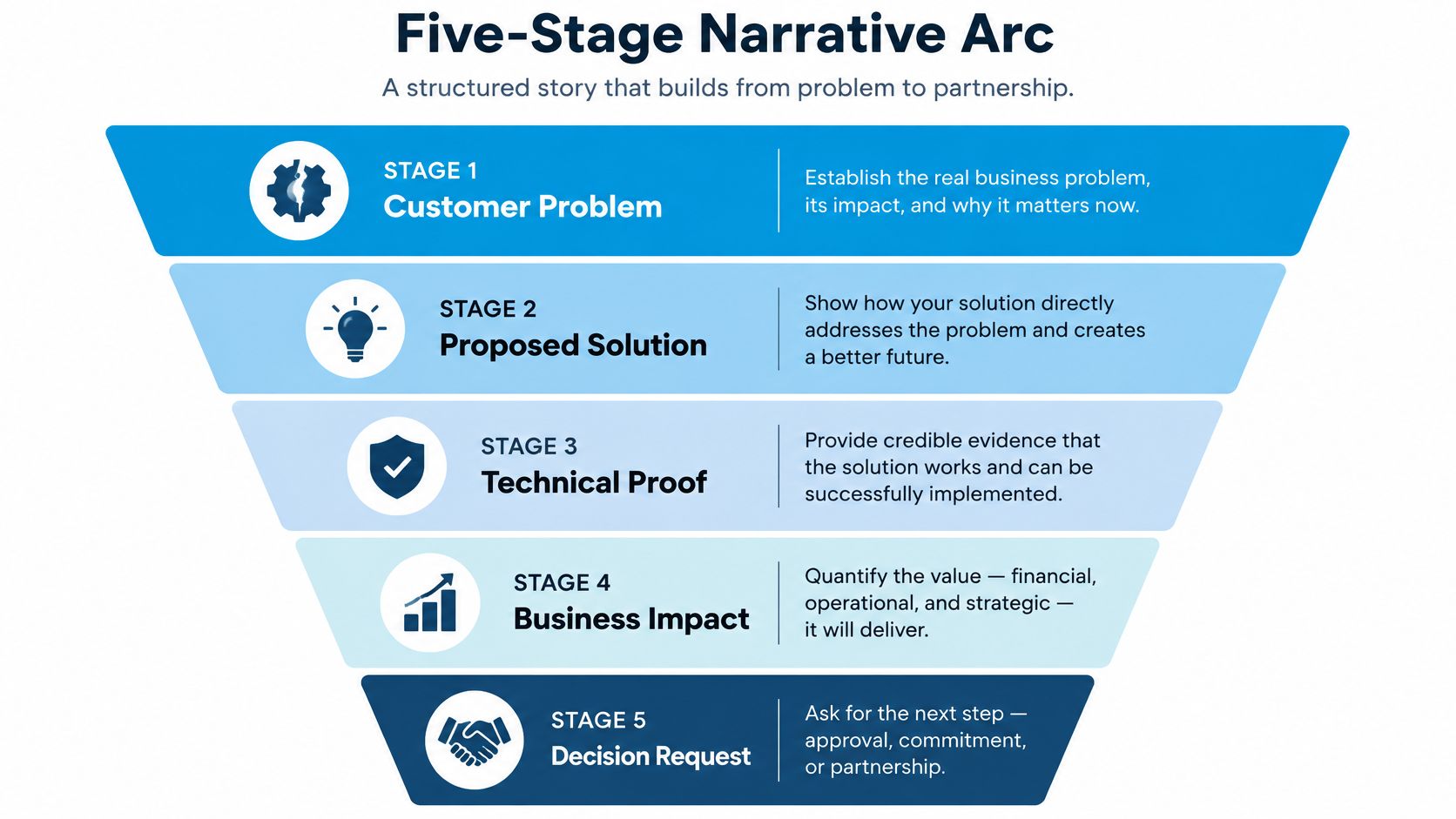
A useful narrative moves through customer problem, proposed approach, proof, risk, and next step. Business impact belongs throughout that sequence, especially when explaining why the evidence matters.
Map the story to buyer questions
| Narrative stage | Buyer question | What to present |
|---|---|---|
| Customer problem | Do you understand our situation? | The agreed workflow problem and its consequence |
| Proposed approach | How would this work here? | The relevant future-state workflow |
| Proof | Why should we believe it? | Observable behavior tied to an acceptance criterion |
| Risk | What could prevent success? | Dependencies, limitations, and validation work |
| Next step | What are we agreeing to do? | A bounded action with an owner and completion condition |
Don't treat risk as a legal disclaimer at the end. Introduce a dependency when it becomes relevant, then consolidate outstanding work before requesting the decision.
The visual below connects the problem and technical proof to business impact and a decision request. Keep risk explicit within that path rather than assuming the buyer will raise it.
Separate the main story from the reference material
For a hypothetical approval-workflow presentation, show the stalled request, the proposed routing, and the resulting ownership record. Explain aloud why that record matters to the customer's operating model. Keep field definitions, configuration options, and unrelated routing variants in backup material.
That separation isn't permission to dodge detail. If a technical evaluator's decision depends on failure behavior, bring that detail into the main conversation. The distinction is decision relevance, not whether the material looks executive-friendly.
Research also argues against confusing speed with effectiveness. A 2016 comparison of traditional PowerPoint and Pecha Kucha found higher ratings on some perception measures for the image-focused format, but no recall advantage over the longer traditional presentation (study published in the Journal of Teaching and Learning with Technology).
Cut material because it doesn't advance the evaluation, not because you're chasing a fashionable slide count.
For additional narrative practice, use the conversation with Peter Cohan on engaging demos and storytelling as a discussion resource with your team.
Write the transition between proof and action before polishing your opening. If you can't explain what the buyer can reasonably do after seeing the evidence, the narrative still needs work.
Delivering In-Person and Virtual Presentations
A conference-room presentation and a shared-screen demo need different delivery choices. Keep the customer story consistent, but adapt how you direct attention and invite participation.
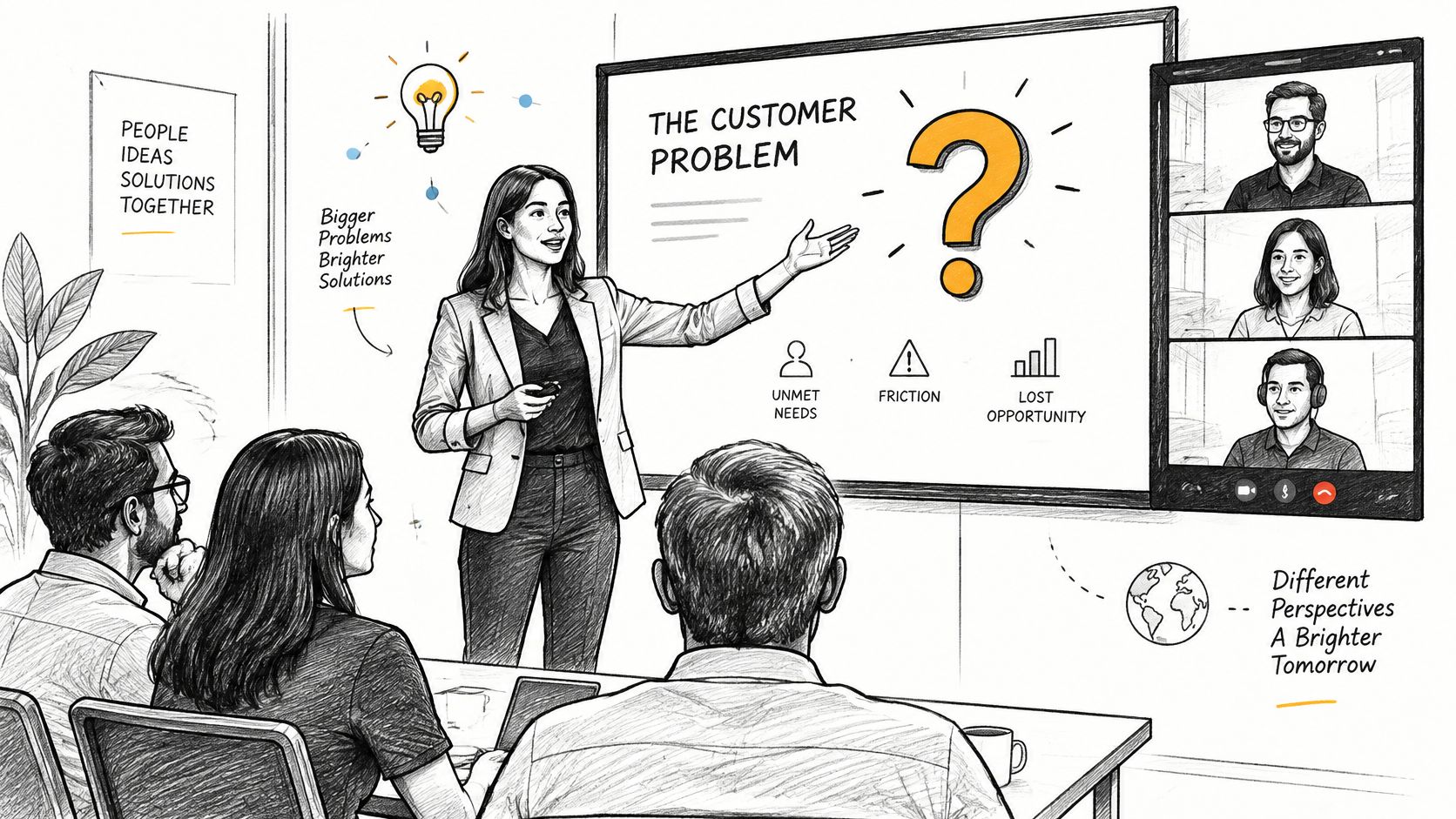
The hybrid setup below captures the practical challenge: you're addressing people in the room and people who experience the meeting through a screen.
Give remote buyers an early reason to listen
Toastmasters' guidance on in-person versus online delivery recommends earlier vocal emphasis for virtual openings, important transitions, and the central implication. In a room, speakers can build vocal variety more gradually.
For an online demo, open with the evaluation problem rather than an extended company introduction. Slow down when stating the constraint you'll prove, emphasize the consequence, and pause before navigating.
| Setting | Delivery adjustment |
|---|---|
| In person | Face the audience during the explanation, not the projected screen |
| Virtual | Name where you're navigating before changing views |
| Hybrid | Repeat room questions into the microphone and invite remote responses |
| Multilingual | Use direct phrasing, explain acronyms, and leave processing space |
Don't narrate every click. Describe the action when it changes the buyer's understanding, then stop talking long enough for them to inspect the result.
Make participation available across channels
Ask a specific question after a meaningful proof point. “Does this match your exception process?” gives the buyer something concrete to correct; “Any questions?” leaves the scope undefined.
Offer spoken and chat-based participation. When using an interpreter, finish a complete thought, pause for interpretation, and avoid continuing to work while another person is conveying your explanation.
For delivery coaching, the conversation with Simone Rechel about virtual body language provides another practice resource. Review camera position, gestures, and whether your attention remains on the audience during discussion.
Use this video as a prompt for a delivery review with a colleague.
If a recorded segment would explain a workflow more clearly than live navigation, consult Wideo's presentation video guide. Keep the segment bounded, introduce what buyers should inspect, and prepare a static fallback. A recording can support proof, but it shouldn't replace the conversation about what that proof establishes.
Rehearsing Like the Real Call Matters
A dry run should expose weaknesses while you can still fix them. Reading your speaker notes aloud won't reveal whether your explanation survives interruptions, navigation delays, or a skeptical evaluator.
Rehearse the actual customer route, including the transition from slides to product and back. Use the same screen-sharing arrangement you intend to use live.
Test the meeting rather than the monologue
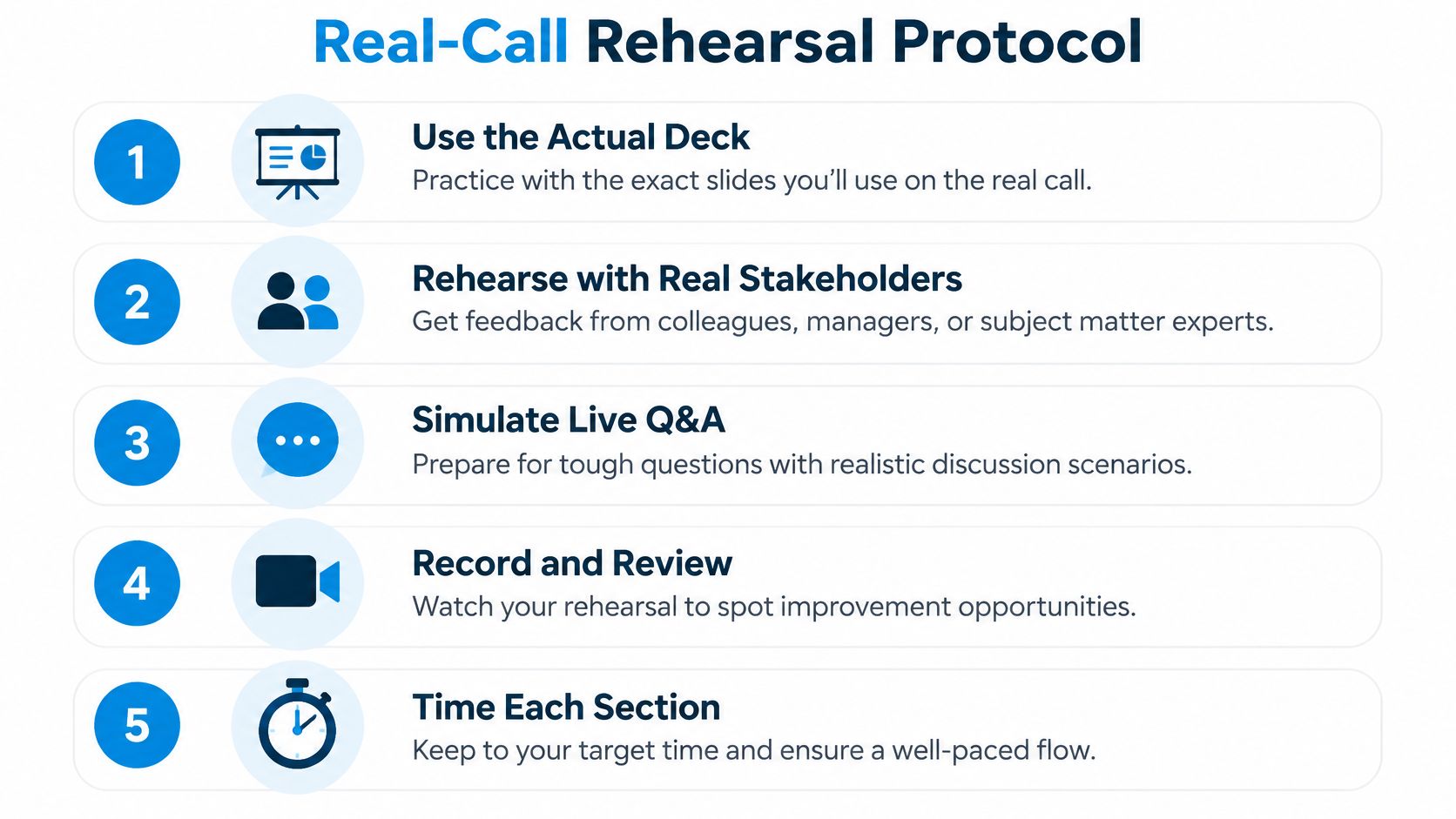
- Run the actual materials. Use the intended deck, demo environment, and backup artifacts.
- Assign buyer roles. Ask colleagues to challenge the presentation from security, operations, and executive perspectives.
- Interrupt the route. Practice answering a relevant question without losing your place.
- Record and inspect. Review navigation silence, repeated explanations, and unsupported claims.
- Time the sections. Mark what you'll remove if discussion takes priority.
Use this rehearsal protocol as a working checklist, not a performance scorecard.
After the rehearsal, ask the reviewer to describe the decision your presentation supports and the uncertainty that remains. Ask again after they've moved on to another task. Treat their answer as a diagnostic, not as proof that a particular design guarantees recall.
The dry-run Knowledge Nugget is a useful resource for making this review part of deal preparation.
Match preparation to the anxiety trigger
More rehearsal isn't always the complete answer. A 2025 systematic review and meta-analysis covering 26 studies and 2,253 participants found a large overall effect for psychological interventions addressing public-speaking anxiety, with substantial variation across people and interventions (Bangor University's review of public-speaking-anxiety interventions).
That doesn't make a sales dry run a clinical intervention. It does support taking the source of anxiety seriously rather than issuing generic confidence advice.
| Trigger | Targeted practice |
|---|---|
| Fear of judgment | Start with a trusted colleague and practice recovering from a deliberate mistake |
| Unexpected questions | Rehearse answer structures, not memorized paragraphs |
| Second-language delivery | Simplify phrasing and practice technical terms for intelligibility |
| Losing your place | Keep a route map of claims, evidence, and transitions |
Prepare recovery language you can use naturally: “Let me restate that more clearly,” or “I'm going back to the requirement we're testing.” If you lose a word, describe the function rather than apologizing repeatedly.
The target isn't flawless speech. It's a presentation you can continue accurately when delivery isn't flawless.
Handling Q&A Without Losing Control
Answer the question the buyer asked before explaining the point you hoped to make. A technically correct detour can still feel evasive.
Treat Q&A as continued discovery, especially when the question exposes a requirement you haven't discussed. Your job is to determine whether it changes the evaluation, then respond at the right depth.
Use an answer structure you can adapt
Start with the direct answer when you know it. Add the relevant boundary, show evidence if needed, and confirm whether you addressed the concern.
| Question type | Useful response pattern |
|---|---|
| Known capability | Direct answer, applicable condition, supporting evidence |
| Ambiguous requirement | Clarifying question before committing |
| Missing detail | State the gap, identify a verification owner, agree on follow-up |
| Broad objection | Separate the disputed assumption from the observable behavior |
| Off-topic detail | Check relevance, then defer with an agreed follow-up path |
Restating a question is useful when you need to clarify scope or make it audible to remote participants. Don't mechanically repeat every question to buy time.
In a hypothetical integration discussion, a buyer asks whether records remain available after a connection fails. Before discussing retry settings, establish whether they mean visibility, durability, or eventual delivery. Those are different acceptance conditions.
Control means keeping the evaluation useful, not keeping yourself talking.
Respond to skepticism without arguing
When a buyer challenges your claim, identify what they dispute. Is the issue product behavior, the demonstration conditions, or the assumption that the workflow fits their environment?
Acknowledge the boundary plainly. If the demo uses prepared data, say so. If you haven't verified production behavior under the buyer's conditions, don't imply that you have.
Use recovery language such as:
- When you don't know: “I don't have that detail confirmed. I'll verify the behavior and include the conditions in the follow-up.”
- When the objection is unclear: “Which part would prevent this approach from meeting your requirement?”
- When the discussion drifts: “Does this affect the current evaluation, or should we handle it in a separate technical session?”
For “I need to check with my team,” ask what the team must determine and what evidence would help them. Offer a focused review with the relevant participants rather than another general presentation.
Use your MEDDPICC discipline for Solution Engineers to connect that discussion to decision criteria and process. Record unresolved questions with owners and completion conditions. Don't convert an unanswered technical concern into an optimistic CRM note.
Your Pre-Presentation Checklist for the Technical Win
Before presenting, review the meeting as an evaluation rather than a performance. You should be able to identify what the buyer already accepts, what remains disputed, and what evidence you're about to provide.
Run the readiness gate
- Discovery context: Confirm that the problem statement still reflects the buyer's priorities.
- Decision request: Write the action the meeting should enable and identify who can authorize it.
- Proof boundaries: Distinguish demonstrated behavior from assumptions and unverified requirements.
- Slide discipline: Check claim-first structure, readable evidence, and the density budget established earlier.
- Narrative route: Keep decision-relevant material in the main presentation and reference detail accessible.
- Delivery conditions: Test screen sharing, audio, captions, and remote participation.
- Rehearsal completion: Verify the actual route, timing, comprehension check, and recovery options.
- Q&A readiness: Assign follow-up owners for questions outside your confirmed knowledge.
Apply an accessibility quality gate
Run PowerPoint's Accessibility Checker, then inspect the deck in its actual presentation mode. Check whether someone can distinguish supported from unsupported states and current from future architecture without relying on color.
The University of Illinois Springfield's PowerPoint accessibility guidance specifies contrast ratios of 4.5:1 for ordinary text and 3:1 for large text. Use labels, symbols, or patterns alongside status colors, and test the deck in grayscale.
Finally, inspect the follow-up artifact. A buyer who missed the meeting should be able to identify the proposed approach, the evidence reviewed, the open risks, and the requested action without reconstructing your narration.
The technical win is earned before the first slide. Discovery quality, not demo polish, decides what deserves to be presented. Delivery earns its place by making that work understandable and usable.
For structured practice beyond a deal-team dry run, PreSales Unleashed GmbH offers the Trusted Advisor Academy, with learning content, live pitch practice, roleplays, and expert feedback tied to active opportunities. Visit the academy to work on discovery, demo narratives, and presentation delivery using the deals you're preparing for now.