
Most demo script advice opens with the same instruction: write an agenda, plan a feature walkthrough, save five minutes for questions. Follow it and you get a 40-minute product tour with a question break bolted to the end. The template turns into a speech you recite, and the buyer turns into an audience.
I'd build the opposite. A software demo script template is a control structure. It fixes the sequence, the time each stage gets, the purpose of each stage and the test that tells you to move on. Discovery notes then edit that structure for the deal in front of you, so the script you run this week is a different document from the one you ran last week.
That shift matters because access is scarce. Gartner's Sales Survey, as reported in 9cv9's collection of demo software statistics, found that 61% of B2B buyers in 2025 preferred an overall buying experience without a sales representative. When a buyer does give you a live hour, a recital wastes the only thing they came for.
What a Software Demo Script Template Must Contain
A template that dictates sentences gets abandoned the first time a buyer interrupts. A template that dictates sequence, time budget and purpose survives contact with a real room. The document you carry into a call should tell you what each stage has to produce and when you're allowed to move to the next one, and it should say nothing about wording.
The investment is justified. TrustRadius's 2024 B2B Buying Disconnect Report reports that 64% of vendors said a compelling demo was the main reason they won a deal. Compelling in that sentence means relevant to one buyer's problem, which is a planning outcome, not a performance one.
| Stage | Planning time (30 min) | Purpose | Exit test |
|---|---|---|---|
| Problem confirmation | 3 min | Restate the problem in the buyer's words | Buyer confirms the problem is accurate |
| Success criteria | 2 min | Agree what this session must prove | Buyer agrees on the criteria |
| Proof points (three or fewer) | 15 min | Show the workflow for the agreed use case | Buyer scores fit for each proof point |
| Objection check | 4 min | Surface gaps, risks and open questions | Each gap is logged with an owner |
| Next step | 6 min | Confirm the buyer-owned action | Date, owner and evidence are agreed |
Problem confirmation is playback, not warm-up. You restate the problem in the buyer's own words, with their numbers, then stop and wait for a yes or a correction. Both answers are useful; silence isn't, so ask the question directly.
Success criteria takes two minutes and rescues the next twenty. The buyer names what the session has to prove, you write it where they can see it, and the call now has a definition of success that doesn't depend on how smooth the clicks looked.
Design rule: A stage without an exit test is a habit, not a stage. If you can't name the sentence that tells you to move on, cut the stage.
Proof points get the biggest block: 15 minutes for three workflows or fewer, each one tied to the agreed outcome. End every proof point with a fit question, because a rating gives you something to work with and a nod gives you nothing.
Objection check and next step close the session. Four minutes of "what would stop this from working in your environment" surfaces the SSO question and the reviewer nobody mentioned while you can still respond, and six minutes of next step ends with a buyer-owned action rather than a promise to follow up.
Here's the fill-in skeleton, one line per slot. The bracketed lines are hypothetical samples, not quotes from any customer:
- Problem confirmation: "You told us the team loses about [hours] a week to [manual step]. Is that accurate?"
- Success criteria: "For this session to be useful, it has to show [criterion one] and [criterion two]. Does that match what you need?"
- Proof point: "This is the approval workflow for [use case], in the view your reviewer uses."
- Objection check: "What would stop this from working in your environment?"
- Next step: "Here is the action we agree on, who owns it and the date."
For a 45 or 60-minute session, expand the proof point block and leave the other four stages at their planning times. Longer calls buy more workflow, not more preamble.
Why pacing rather than polish? Gong Labs' analysis of 67,149 recorded B2B sales demos from before September 2017 found closed-won demos averaged 47 minutes against 36 minutes for other demos, with talk-to-listen ratios of roughly 65:35 in wins and 66:34 in losses. Talking less wasn't the differentiator. The sharpest finding was the monologue ceiling: no winning demo contained more than 76 seconds of uninterrupted pitching. That doesn't prove a script closes deals. It does show that buyers stay in conversations and leave monologues, which is a structural argument, not a stylistic one.
Paste the table into a working document and label each slot with the buyer question it answers. If a room has several stakeholders, poll them on fit at each proof point so you get a number instead of a nod; the audience response system selection tips cover what to check before you pick a tool, from anonymity settings to how results export.
Turn Discovery Notes Into Script Decisions
Discovery decides which demo you build. That sounds obvious until you watch a team run the same 40-minute walkthrough across six opportunities and then wonder why the technical win rate stalls. The skeleton doesn't change. The inputs do, and they change the script.
Before you open a deck, write a three-line brief: one buyer, one business problem, one desired next action. If you can't write the brief, you aren't ready to demo. What's on the calendar is a product tour request, and a tour is what happens when nobody did the work upstream.
| Discovery signal | Script change | Evidence to prepare |
|---|---|---|
| One pain point with a named owner | Build the whole demo around one workflow | Walkthrough using the buyer's data shape |
| Several use cases competing for time | Keep one on the core path and move the rest to an optional branch | Parking-lot slide for the other use cases |
| Unresolved technical constraints, such as SSO or data residency | Add a technical validation checkpoint | Architecture note and integration list |
| Unclear decision process or missing approver | Shorten the demo and ask decision-process questions first | Question list for the next call |
| No defined problem or no budget path | Do not run the full demo yet | Written discovery follow-up with the open questions |
The ordering most SaaS teams converge on is qualification, then discovery, then demonstration. Docket's description of the SaaS sales process puts need, authority, budget, timeline and fit through a qualification check first, with discovery mapping the current problem, the tools in use and the decision process. Run it the other way and you're building a walkthrough for an opportunity that has no defined problem and no viable path to a signature.
Keep a running capture of the buyer's exact words during discovery. If the operations lead says "we rebuild the schedule by phone every morning", that sentence becomes your problem confirmation line, verbatim, on the next call. Translating it into "resource allocation inefficiency" tells the buyer you weren't listening, and it costs you the credibility the demo needs.
Question sets for that conversation live in the discovery call guide, and the technical discovery questions are the ones SEs most often skip because they feel like a detour from the business case. They aren't. A sandbox constraint or an Okta provisioning requirement discovered late turns a strong demo into a three-week stall. Academy members apply these frameworks to their current deals and get feedback on their own discovery calls, demos and POCs, which is where the mapping above stops being a diagram.
Tailor the Proof to Each Buyer Role
The user role column in your traceability matrix comes from here. One demo usually carries several audiences, and each one needs a different kind of proof, in a different order, with different material cut.
| Buyer role | Proof they need | Show | Skip |
|---|---|---|---|
| End user | Task completed without rework | Daily workflow in two or three screens | Admin setup and configuration |
| Technical evaluator | Integration path, security and permissions | Permissions model and integration flow | Feature menus unrelated to the use case |
| Economic buyer | Business consequence in their own metric | One outcome from their use case with real numbers | Navigation and interface tours |
| Champion | Internal case they can take to the committee | Summary artifacts and the success criteria record | Detailed walkthrough they have already seen |
Say a 30-minute session has an operations manager, an IT architect and a CFO on the line. Hypothetical, but the shape is routine. The operations manager sees the daily workflow in three screens and confirms it matches how her team works. The architect sees the permissions model and the integration path, and gets a follow-up artifact with both. The CFO sees one outcome expressed in the reporting terms her finance team already uses, which takes two minutes and carries more weight than the other twenty-five.
That last point has a structural reason behind it. Gartner's 2023 global software buying trends report describes buyers in the evaluation stage combining personalized product demonstrations with product documentation, user guides, online training resources and information about support capabilities. The live demo is one evidence source in a package. So every proof point needs a follow-up artifact the buyer can keep and forward: workflow documentation, an implementation note, security material, support details.
Two habits make this workable. Ask the champion which role carries the internal case, then over-prepare for that role and under-prepare for the rest. And when an executive joins late, restate the success criteria and the result you've already shown in one minute. Replaying the demo for the newcomer loses the room you already had.
What ties the roles together is narration. The demonstrate to win pattern pairs every click with the business effect it produces, in the language of whoever is watching, so the same screen can serve a user, an architect and a CFO without three separate performances.
How to Fill In the Template Step by Step
A finished script is an evidence plan. Every click connects a stated requirement to an observable outcome, and technical depth enters only when it removes perceived risk. That's the test for whether a step belongs, not whether the feature is impressive.
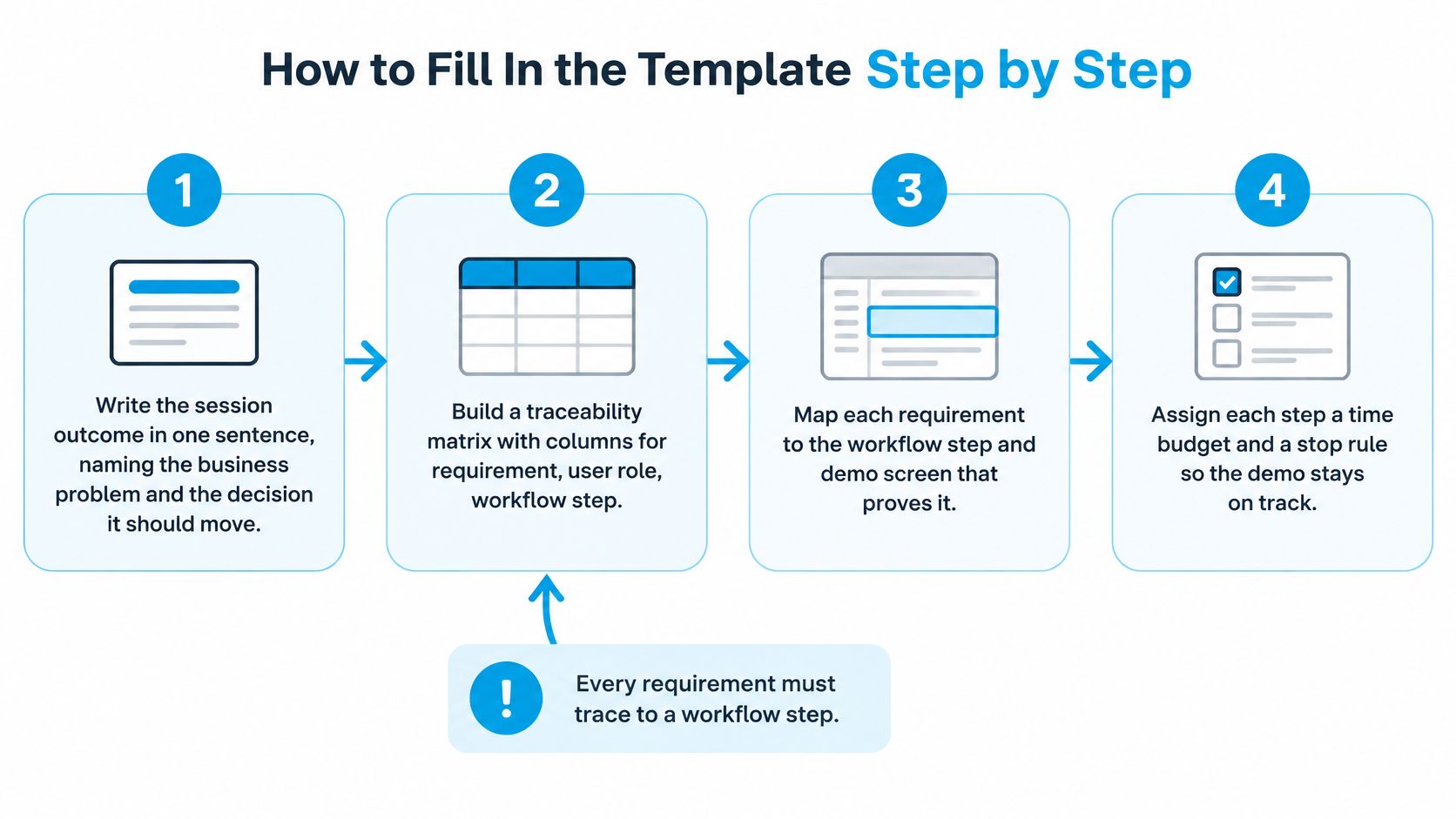
- Write the session outcome in one sentence, naming the business problem and the decision the call should move. If the sentence contains two decisions, you have two demos.
- Build a traceability matrix with columns for requirement, user role, workflow step, evidence shown, success metric and unresolved risk. The matrix is what stops a proof point from surviving on charm alone.
- Cut to the minimum viable scenario, meaning the fewest screens that prove the top requirement. Extra screens add surface area for questions you didn't plan to answer.
- Write narration for each click that pairs the user action with the business effect. "She approves in two clicks" is a click; "the approval lands in the requester's queue before the shift ends" is the reason the buyer is sitting there.
- Add a fit-scoring question after each proof point, asking the buyer to rate how closely the workflow matches their current process. Ratings expose gaps while you can still close them on the call.
- Mark checkpoints for security, integrations, data migration, administration and evaluation ownership, and assign each one an evidence artifact or a named follow-up owner. These are the items that kill deals three weeks after a good demo.
- Run a dry run on realistic data, not fabricated records that hide implementation constraints. Dummy tenants produce confident answers and surprised buyers.
- Rehearse with a colleague playing the buyer, time the run against the stage table, and note the moment a buyer would start checking their phone. That timestamp is the actual length of your demo.
Worth calibrating against: a Storylane analysis of B2B buyer journey statistics reports a 46% close rate when buyers had demo access versus 38% without it across roughly 68,000 B2B deals. The source is vendor-owned, so treat it as directional rather than causal. Access correlates with closing; it doesn't prove the demo did the closing.
The failure modes are consistent. Unverified integrations presented as live, jargon standing in for an explanation, fabricated data that hides migration work, and roadmap items described as though they ship tomorrow. Save the finished script with the matrix attached, so the next call on the account opens with evidence instead of a fresh guess.
Set Pacing, Stop Rules and Exit Criteria
The default advice says tell the story, show every key feature, finish with questions. It's a bad plan, and the engagement numbers make the case better than I can.
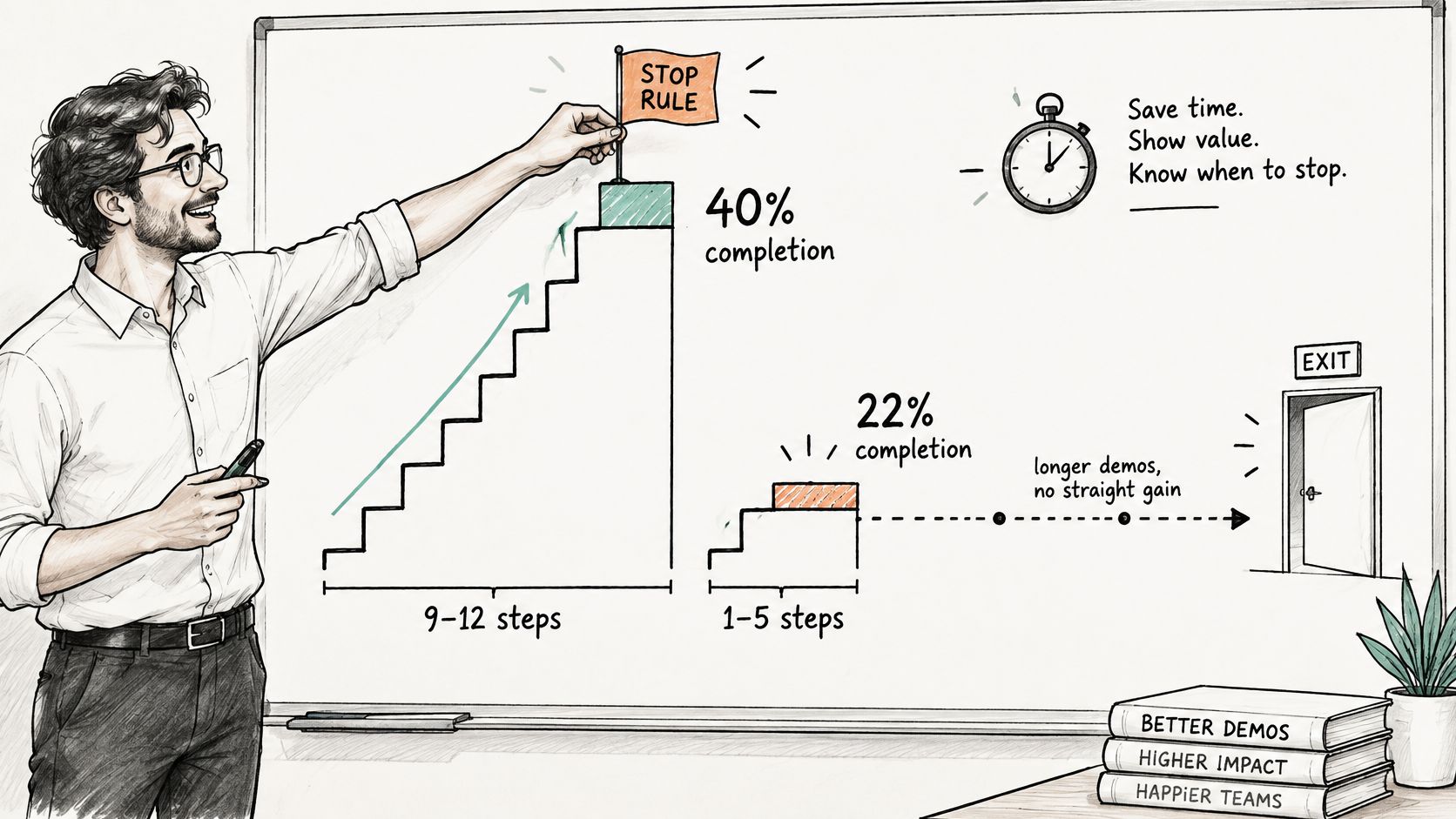
An analysis of 14 million interactive demo sessions published by Arcade found that 9 to 12 steps produced a 40% completion rate against 22% for 1 to 5 steps, but the curve didn't climb in a straight line, and step 7 was a common abandonment point. The same report notes that 45% of demo views happened within the first hour of distribution, while average view rate sat at 38%. Attention arrives fast and leaves at a predictable place.
The practical read: put a value proof in the first minute that shows the buyer something useful before any setup, cap the number of decision-relevant moments at three, and treat step 7 as the place to spend your strongest proof rather than your company history.
Branch instead of touring
Branching is what separates a script from a tour. When the buyer leans into one area, move to the matching branch and drop the rest. You planned three branches; you'll run one. That's the design working, not the plan failing.
Then write the stop rules down before the call, so the decision isn't made in the moment by an SE who doesn't want to disappoint anyone.
| Signal | Action |
|---|---|
| Buyer cannot name the problem after discovery | Stop the demo and return to discovery |
| Buyer will not agree to success criteria | Stop, log what blocks agreement and schedule a follow-up |
| Buyer engages with one area | Move to the matching branch and drop the remaining content |
| Buyer disengages during setup | Return to the first-minute value proof and cut the setup |
The Demo module in the Trusted Advisor Academy teaches the same shape deliberately: a focused 15-minute demo built around three features that address the customer's exact problem, rather than a 40-minute product tour. Test that against your own last demo. If you can't name the three features and the problem they answered, the tour ran you.
After the call, measure completion and next-step conversion per demo type, and change one variable at a time: the opening problem statement, the order of proof, or the wording of the ask. Changing all three at once tells you nothing except that something moved.
Close Each Demo With a Mutual Action Plan
The exit signal of a demo is the buyer's agreement on success criteria. Not "great, thanks". Not "we'll be in touch". If you leave without criteria confirmed, the call was a presentation, and presentations get discussed in meetings you aren't in.
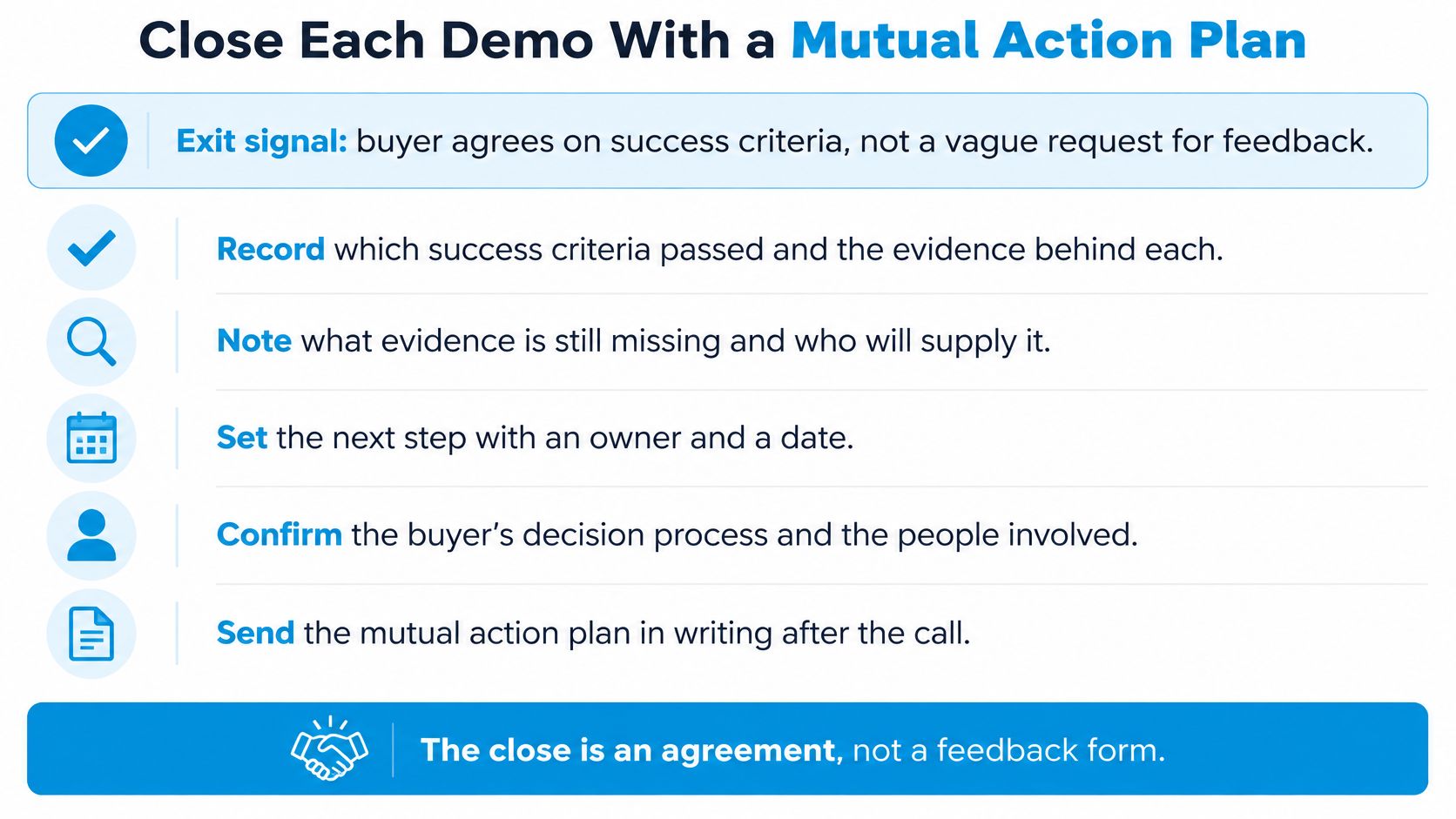
The close is a working document, not a courtesy recap. It records which criteria passed, what evidence is still missing, who owns each open question, and the date or condition for the next evaluation step.
A mutual action plan covers six items:
- Validated use case, stated in the buyer's words rather than your product's vocabulary.
- Success metric, the number the buyer will use to judge whether this worked.
- Required stakeholders, including the approver who wasn't on the call.
- Technical validation tasks, each with an owner and a date.
- Decision date, the point by which a yes or no is expected.
- Next meeting, in the calendar before anyone hangs up.
Picture the close as a hypothetical. The buyer confirms the reporting requirement passed, the SSO question stays open, IT owns a sandbox test, and the group reconvenes in two weeks with the security reviewer present. That's four lines in an email and a calendar invite, and it's worth more than any slide in the deck.
Measure the demo on requirement coverage, stakeholder expansion, agreed evaluation criteria and progression to a qualified technical validation. Attendance and applause tell you the room was polite; these four tell you whether the buying decision moved. The mutual action plan template gives you a structure to fill in during the call rather than reconstructing it from memory afterwards.
Send it within a day, while the buyer's phrasing is still fresh in your notes. And treat any criterion the buyer rejects as the most valuable output of the session, because a rejection you can name is a gap you can close before the committee meets.
Run the Template on Your Next Live Deal
Reading this doesn't change a deal. Running it on one live opportunity this week does. Here's the sequence I'd follow, in order.
- Copy the stage table into a working document and keep it open during discovery calls, not just demos. The stages tell you what to listen for.
- Run one live opportunity through the qualification gate: need, authority, budget, timeline and fit. If it fails, the demo isn't the next step.
- Write the one-buyer, one-problem, one-action brief and build the traceability matrix with the fill-in steps, so every click has a requirement behind it.
- Dry-run it on realistic data and time each stage against the table. Log which stage ran long and why.
- Send the mutual action plan within a day, listing the criteria that passed, the open items and their owners.
- Review afterwards: which stage lost the most time, which criteria passed, which proof point the buyer scored lowest. Change one variable before the next demo.
If you want a second pair of eyes on your discovery approach before you build the script, book a discovery call and run the opportunity past someone who does this every week. The Academy also ships 100+ ready-to-use assets such as templates, checklists, AI prompts and phrasing guides, which work best as a starting structure that your own discovery notes then edit. There's a community of SEs trading scripts and scenarios as well, which is the fastest way to find out whether your template survives someone else's deal.
If the demo you're about to run still depends on how well you recite a walkthrough, PreSales Unleashed GmbH runs the Trusted Advisor Academy, a year-round program where Solution Engineers rebuild discovery and demo habits against the deals already on their desk. You bring a live opportunity, get feedback on the script and the plan, and leave with a document your buyer can co-sign. Visit PreSales Unleashed GmbH to see how the discovery and demo modules fit the quarter you're selling into.