
The most popular advice about demos is to personalize them. That's incomplete. A prospect's logo, familiar terminology, and polished sample data won't rescue a demonstration built around the wrong problem. Your demo is only as good as the discovery behind it.
No discovery, no demo. Most weak demos fail before the first screen is shared because the Solution Engineer (SE) never learned which problem the buyer needs solved, who needs evidence, or what would count as success. Discovery quality, not demo polish, decides whether you're proving something the buyer needs.
That doesn't mean every prospect needs an exhaustive interview before seeing the product. It means the depth of your demonstration must match the depth of your understanding. A buyer-selected use case can justify an exploratory tour. A custom sandbox requires much more.
- Start with the problem. Know the workflow, constraint, or uncertainty you're addressing.
- Identify the evaluator. Understand who can accept the evidence and who still needs convincing.
- Define the technical win. State what the buyer should be able to confirm afterward.
Borrow from methods for user research when you need to distinguish what buyers say they want from how they work. These eight demo examples connect discovery inputs to formats you can run. Pick the format your discovery supports, not the one your team defaults to.
1. Discovery-Anchored Day-in-the-Life Demo
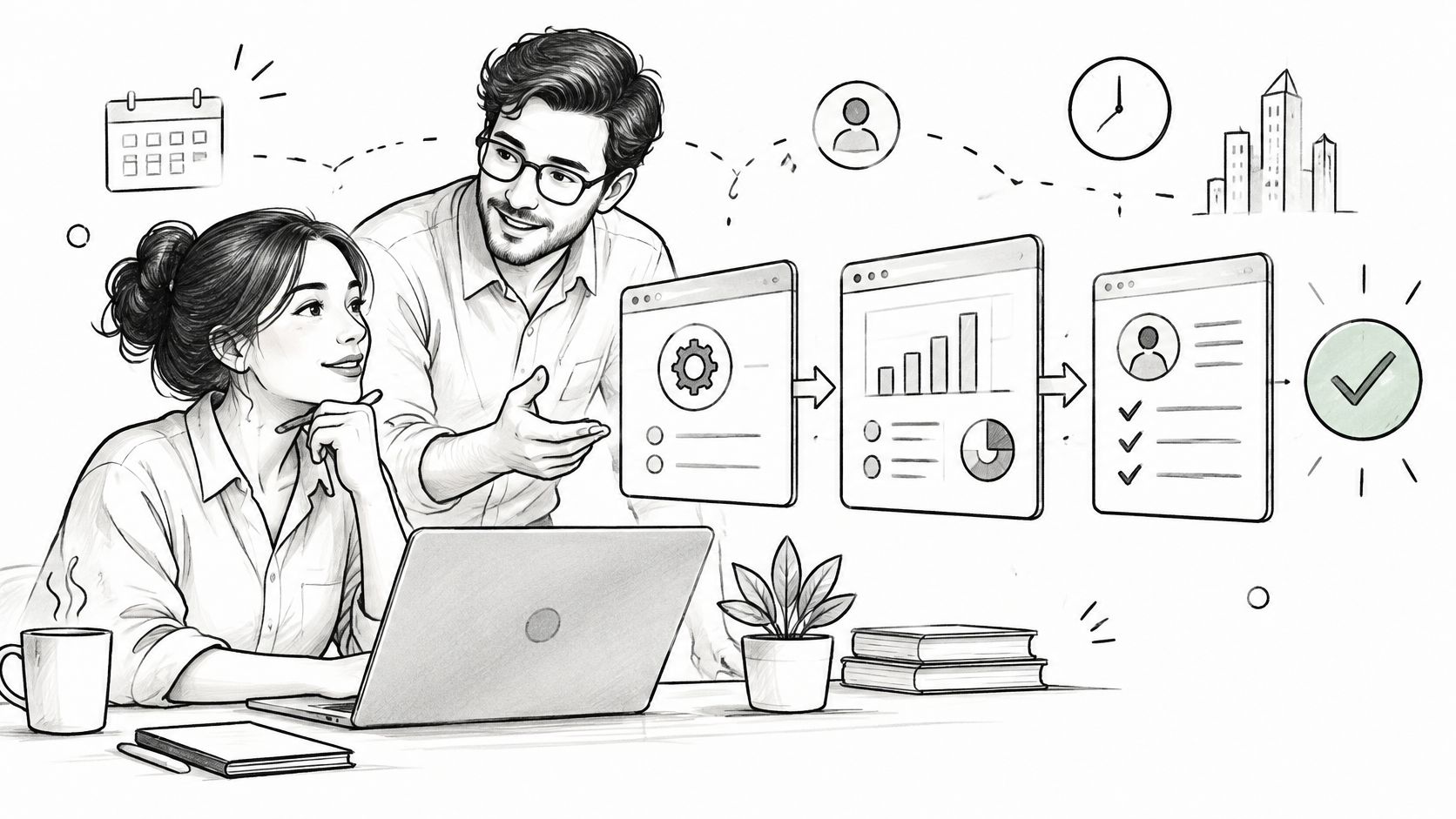
Start with the buyer's workflow, not your navigation bar. A day-in-the-life demo follows a named role from a recognizable trigger through the work required to reach an outcome.
Discovery required: the current process, the painful handoff, the people involved, and the buyer's success criteria. If you can't describe those without opening the product, use the discovery call guide before building your script.
Build Around the Difficult Step
Hypothetical example: A revenue operations lead describes territory changes that require manual reassignment and repeated approval checks. You demonstrate the reassignment, show how exceptions reach the right approver, and confirm how the new ownership appears downstream. You skip the reporting module because reporting wasn't part of the problem.
Don't narrate every click. Explain why the person takes the action, what changes, and which manual task disappears.
- Write the workflow first. Use the buyer's language for roles, triggers, and handoffs.
- Start with friction. Ask which step they dread, then make that step visible.
- Validate the outcome. Ask whether the demonstrated flow matches their operating reality.
- Cut unrelated screens. A feature earns its place by answering a documented pain.
The technical win is buyer confirmation that their required workflow can operate in the product, including relevant exceptions.
This format fails when you substitute a generic persona for actual discovery. Stop when the buyer confirms the process, rather than continuing until you've exhausted the product. If they correct your assumptions, update the workflow before adding more features.
2. Self-Guided Interactive Product Tour or Sandbox
Let buyers explore independently when you know their area of interest but haven't earned a deeper evaluation yet. A guided interactive tour uses tooltips, hotspots, or prepared data to put the buyer in control of the pace.
Navattic and similar interactive-demo products support this category. Distinguish a clickable simulation from a working sandbox, because completing a guided path doesn't prove that an integration, permission model, or import will work.
Gartner's B2B buying report reports that 75% of B2B buyers prefer a sales experience without a representative, while buyers using digital self-service alone are 1.65 times more likely to experience purchase regret than buyers using traditional representative-led processes. Give buyers control without removing access to interpretation.
Practical rule: Use self-guided exploration to improve the next conversation, not eliminate it.
Discovery required: a buyer-selected role, problem, or use case. On an open website, a use-case selector can gather this initial context; it isn't permission to claim account-specific fit.
Hypothetical example: A buyer completes a workflow-builder tour. On the next call, you ask which step they wanted to change, then investigate the approval logic behind that answer.
- Narrow the path. Include only the use cases relevant to the buyer's stated interest.
- Request a response. Send the tour with a question about their workflow.
- Reserve live validation. Discuss permissions, imports, and integrations separately.
- Maintain accuracy. Review captures whenever the interface or behavior changes.
For adjacent evaluation context, Sayprimer research from Docket can inform your questions, but it doesn't establish fit for your account.
The technical win is a confirmed use-case fit worth investigating. Clicks alone don't establish it.
3. Scripted Feature Tour (The Traditional Demo, and Why It Fails)
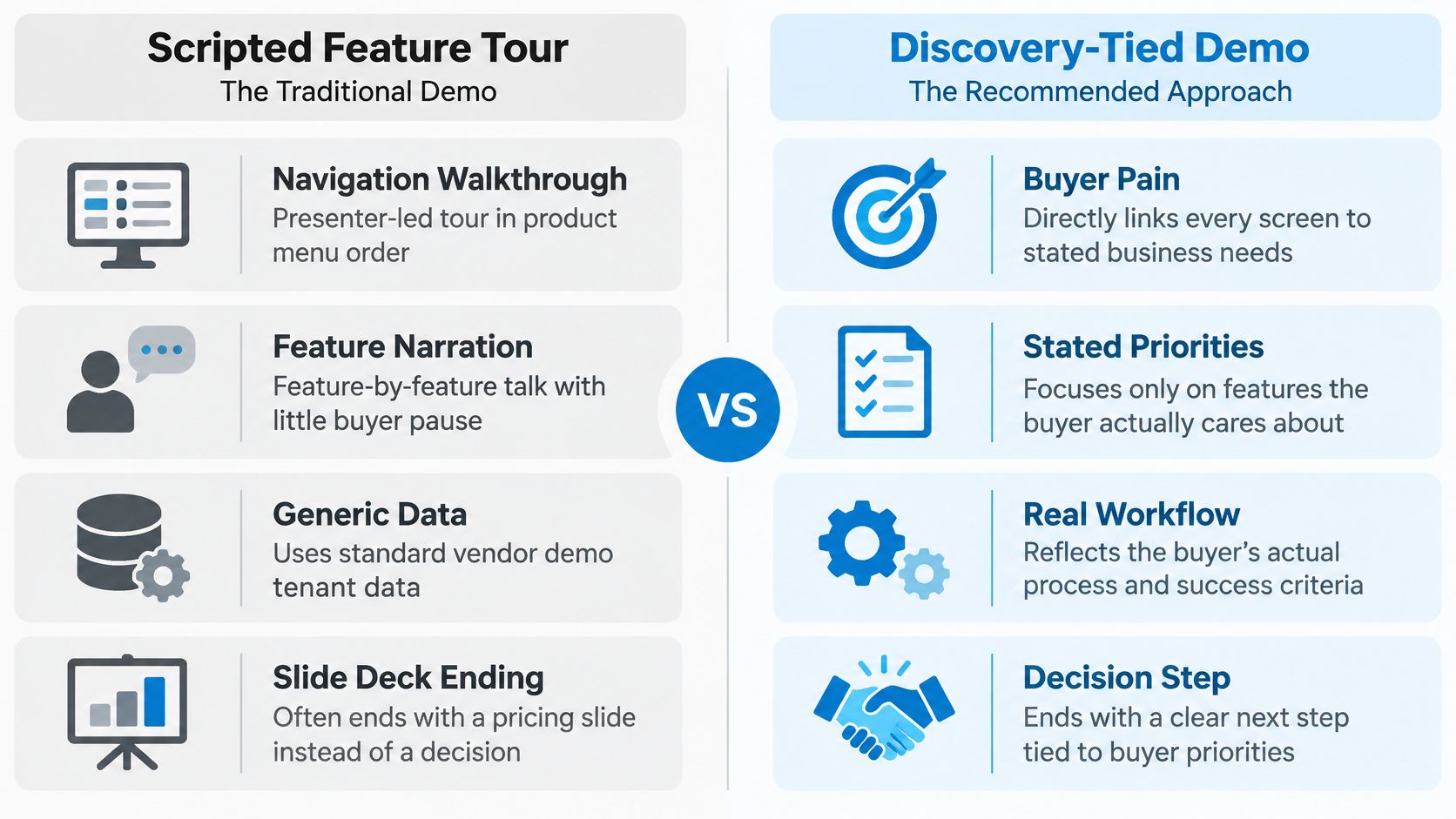
A scripted feature tour follows the product's structure: menus, modules, settings, then next steps. It's useful when a buyer has already defined their requirements and wants to confirm specific capabilities.
It fails as a default because product order isn't buyer priority. You can demonstrate every module and still leave the evaluation's central uncertainty untouched.
Hypothetical example: An SE walks through every CRM module while the buyer's actual concern is how account ownership changes affect open opportunities. The call ends with a request to share the recording, but nobody agrees on what happens next.
Keep the Script, Change the Sequence
A script isn't the enemy. An unqualified script is. Use the software sales demo guide to connect your structure to buyer needs rather than treating navigation as the agenda.
Discovery required: a prioritized capability list and an explanation of why each capability matters. Without that, return to discovery instead of presenting the complete catalog.
- Ask for priorities. Have the buyer identify the capabilities they need to verify.
- Time-box each module. Stop once you've answered the requirement.
- Check understanding. Ask what remains unproven rather than whether they liked it.
- Secure progression. Assign an owner and next action for unresolved questions.
Watch buyer participation, but don't treat silence as proof of disinterest. A quiet evaluator may be taking notes or lack permission to speak candidly.
The technical win is explicit confirmation that named requirements are supported. A request to forward the deck isn't a substitute for that confirmation.
4. Technical Deep-Dive for Architecture, Security, and Integration
Technical evaluators need boundaries, dependencies, and failure behavior. An attractive interface won't answer where data travels, how access is controlled, or what happens when an upstream service fails.
Discovery required: the buyer's existing architecture, identity provider, data classifications, integration dependencies, and approval process. Identify the people authorized to accept security and architecture evidence before scheduling the session.

Hypothetical example: A security reviewer needs to understand restricted administrative access and auditability. You demonstrate role-based permissions, attempt an action with an unauthorized account, and inspect the resulting audit record. Then you share the architecture diagram through an approved channel.
Demonstrate the Boundary, Not Just the Happy Path
Open with the business workflow under review, then let the technical audience prioritize the areas that could block approval. Show API requests and responses, webhook handling, authentication behavior, or SSO configuration only where they address those concerns.
- Agree on acceptance. Define what evidence would resolve each technical question.
- Expose dependencies. Separate native capabilities from configuration, custom code, and external services.
- Own unanswered questions. Assign a person and due date before ending the call.
- Record with permission. Confirm what can be recorded and shared internally.
The technical win is acceptance that the proposed design meets the buyer's relevant environmental constraints. It isn't a promise that implementation has no risk.
This format fails when you invite technical stakeholders into an unstructured interrogation. Keep a visible issue log and distinguish demonstrated facts from items requiring further testing. Don't improvise a security commitment to preserve momentum.
5. Business Outcome and ROI-Led Executive Demo
An economic buyer needs to understand what changes operationally, why the change matters, and which assumptions support the business case. Show the workflow changes that explain the outcome, not every screen used to configure them.
Salesforce's seventh State of Sales report says 69% of surveyed sales professionals report that measurable ROI is more important to customers than it was the prior year. That's a reason to make the outcome explicit, not permission to invent a return.
Discovery required: an economic buyer, a measurable baseline, the desired change, and agreement on how the buyer will assess value. Use the MEDDPICC guide for SEs to connect these inputs to decision criteria.

Separate Evidence From Assumptions
Hypothetical example: A CFO wants shorter invoice approval cycles. You show the current handoff, the proposed routing, and the exception process using the company's discovery inputs. Any projected improvement remains an estimate until the buyer validates it.
- Use the buyer's baseline. If it's missing, ask for it rather than substituting vendor benchmarks.
- Label estimates. State the inputs, assumptions, and exclusions behind each calculation.
- Explain adoption requirements. Identify process changes and implementation work.
- Pair business and technical evidence. Arrange the technical review needed to support the proposed outcome.
The technical win is agreement that the demonstrated capabilities provide a credible path to the business outcome, subject to stated assumptions. Budget approval and the commercial decision remain separate.
This format fails when the executive sees savings claims that operations can't defend. Keep the business case traceable to an observable workflow change.
6. Asynchronous Recorded Demo Video
A recorded demo earns its place when the buying group is wider than the calendar you can control. It is a decision aid built for someone who was not in the room, with tighter scope than a full call recording.
Hypothetical example: After discovery, you record the buyer's approval workflow so the champion can share it with finance. The opening restates the delayed handoff, the middle answers that problem, and the close asks finance to confirm who owns the exception path.
Discovery required: a specific question, a defined audience, and a requested response. Tools such as Loom make recording straightforward; your harder job is deciding what the recipient must learn.
The embedded YouTube player below is a reference for pacing and structure; use it to judge format, not as proof for a product claim.
Help the Champion Carry the Case
McKinsey's Global B2B Pulse analysis reported that buyers used up to 10 or more channels in a purchase journey in 2021. Keep the recording consistent with the live discussion, documentation, and evaluation plan so a forwarded link does not become a separate version of the truth.
- Open with the problem. Give colleagues who missed discovery enough context to understand the decision.
- Keep a focused scope. Separate unrelated use cases into different recordings.
- Make limitations visible. State what the recording does not validate.
- Ask for a decision-relevant reply. Request confirmation of a requirement, owner, or test.
A forwarded video creates access to another stakeholder. It does not prove that stakeholder agrees.
The technical win is a stakeholder's confirmation or a clearly identified objection. View counts are engagement signals, not approval.
Async fails when you send a link without arranging follow-up. Agree when you will discuss the response, then use that conversation to surface disagreement instead of assuming the champion settled it internally.
7. Mirror Demo with Prospect Data (Custom Sandbox)
A mirror demo reproduces the buyer's operating context inside a controlled environment. Familiar account structures, approval rules, and sample records help evaluators inspect fit without mentally translating generic demo data.
Discovery required: a validated workflow, meaningful configuration details, approved data handling, and a decision that the customization will support. Don't build a custom environment because the opportunity is important; build it because specific uncertainty requires it.
Customize the Constraint
Hypothetical example: You configure the buyer's regional sales hierarchy and approved sample approval thresholds. Then you move a deal through the expected approval chain, including an exception that caused trouble in their current process.
The demonstrate-to-win approach is useful for keeping that preparation tied to a decision. Changing logos while ignoring the difficult business rule adds decoration, not evidence.
- Get written approval. Agree on permitted data, access, storage, and deletion before importing anything.
- Prefer synthetic records. Reproduce relevant structure without carrying unnecessary sensitive information.
- Limit configuration. Prepare the workflows that can change the evaluation outcome.
- Document the setup. Record changes so implementation teams can distinguish reusable configuration from demo-only preparation.
Technical guidance on using real user traffic in tests provides context for testing decisions, but it doesn't replace buyer authorization or security review.
The technical win is confirmation that the buyer's meaningful operating constraints can be represented and handled correctly.
This format fails when realism creates false confidence. State which integrations are live, which responses are simulated, and which behaviors remain untested. A familiar-looking environment isn't automatically an implementation blueprint, and the buyer needs to understand that distinction.
8. Proof-of-Concept Kickoff and Evaluation Walkthrough
A proof-of-concept kickoff should produce an executable acceptance plan. Demonstrate only enough product behavior to help the buyer begin the agreed tests.
NIST's software-acceptance guidance calls for measurable acceptance criteria, requirements mapped to test cases, defined procedures, and documented error-reporting and analysis methods. Apply that discipline before giving the buyer an environment.
Discovery required: unresolved technical risks, business relevance, available test data, evaluation resources, a named decision maker, and written pass/fail conditions. If those are missing, you have trial access, not a structured evaluation.
Make the Decision Meeting Part of the Kickoff
Hypothetical example: An SE and buyer agree to test approval routing, exception visibility, and audit export against written requirements. They assign test owners, book a checkpoint, and schedule the final decision meeting before testing starts.
Use a proof-of-concept plan template to capture the agreement. Keep it specific enough that someone who missed the kickoff can run a test and understand the result.
- Map requirements to tests. Define inputs, expected behavior, evidence, and acceptance authority.
- Control scope changes. Require explicit agreement before adding new criteria.
- Assign both sides. Buyer tasks need owners just as vendor tasks do.
- Define closeout. Agree how failed, passed, and inconclusive tests affect the decision.
Evaluation boundary: Don't extend a POC because the calendar expired. Extend it only for a named unresolved question with an agreed test.
The technical win is buyer acceptance of the evidence against agreed criteria. Track that distinction through your North Star technical win rate, rather than treating every completed trial as a win.
A disciplined POC may also reveal a genuine mismatch. An explainable disqualification is more useful than an evaluation nobody can close.
How the eight demo formats compare on fit, prep effort, and discovery required
| Item | Best for | Prep effort | Discovery required |
|---|---|---|---|
| Discovery-Anchored Day-in-the-Life Demo | Showing one buyer's workflow and outcomes | High | Essential |
| Self-Guided Interactive Product Tour or Sandbox | Buyers who want to explore independently | Medium; ongoing upkeep | Some use-case discovery |
| Scripted Feature Tour (The Traditional Demo, and Why It Fails) | Buyers seeking a broad capability overview | Low | Minimal |
| Technical Deep-Dive: Architecture, Security, and Integration Demo | Technical evaluators assessing fit, security, and integrations | High | Technical criteria and environment context |
| Business Outcome and ROI-Led Executive Demo | Economic buyers focused on measurable business value | High | Essential; needs buyer baseline metrics |
| Asynchronous Recorded Demo Video | Buyers across time zones or champions sharing internally | Medium | Some; to tailor the use case |
| Mirror Demo with Prospect Data (Custom Sandbox) | Late-stage evaluations needing a realistic fit assessment | Very high | Extensive; includes workflow and data approval |
| Proof-of-Concept Kickoff and Evaluation Walkthrough | Structuring a trial around measurable success and a decision | High | Essential; needed to define success criteria |
Pick the Format Your Discovery Earns
Choose from these demo examples based on what you learned, not what you're comfortable presenting. If the buyer named a workflow, run the day-in-the-life demo. If the economic buyer shared a baseline, build the executive version around it.
If technical reviewers identified an architecture risk, show the relevant boundary and evidence. If a POC has no success criteria, stop and write them before anyone touches the product. More product access won't resolve an undefined decision.
Match Preparation to the Uncertainty
The trade-off is between preparation cost and decision value. A custom sandbox can be justified when a buyer must validate a complicated approval structure. It's wasteful when the buyer only needs to understand the basic workflow.
Don't assign every first look to an SE by default. An account executive can own an approved orientation when the question is basic product relevance. Bring the SE into discovery and validation when technical risk, workflow complexity, or evaluation design requires that judgment.
- Insufficient context: Gather the missing discovery instead of dressing up a generic tour.
- Known workflow: Demonstrate the process and ask the buyer to confirm fit.
- Known technical risk: Agree on the evidence needed to resolve it.
- Distributed buying group: Give each stakeholder relevant proof and a response to own.
- Unresolved fit: Run a bounded evaluation with explicit acceptance criteria.
The same opportunity may need several formats, but each should answer a different question. Don't replay the same presentation for finance, security, and operations and call it stakeholder alignment. Find out what each group must approve and where their requirements conflict.
Coach the Decision, Not Just the Delivery
When reviewing a demo, ask what discovery justified it, what the buyer confirmed, and what remains uncertain. Delivery matters, but a smooth presentation with no acceptance evidence hasn't established a technical win.
If your team still defaults to feature tours, the Trusted Advisor Academy's Demo module teaches 15-minute demos built around three features that address the customer's exact problem. Members apply frameworks to current deals and receive feedback on their discovery calls, demos, and POCs.
Bring an active opportunity to a discovery call and identify the missing input, the right demonstration format, and the evidence your buyer needs next. Start with the deal you're preparing now, not a hypothetical presentation you might use someday.
PreSales Unleashed GmbH offers structured PreSales training and live practice through the Trusted Advisor Academy, connecting discovery, demo design, and POC management to active opportunities. Visit PreSales Unleashed GmbH to explore how focused practice and feedback can help your team build demos around a defensible technical win.