
A manual B2B software demo can cost more than $330 per session once you count sales consultant and account executive salaries and preparation time, according to the Consensus 2026 B2B buyer behavior report. That number should change how you treat a demo request. You're not booking a meeting. You're spending scarce Solution Engineer (SE) and AE capacity that can't go to another deal.
Most PreSales teams track demo volume. Few track demo costs by role, by type, or by outcome. That's why unqualified demos feel free in the moment and expensive at quarter end, when your senior SEs are overloaded and your best opportunities didn't get enough technical time. The fix starts with a simple rule. No discovery, no demo. Discovery quality, not demo polish, decides whether that spend earns a technical win.
What One Demo Costs Your Team
Start with people hours, not software. The table below puts the reference points side by side so you can place your own motion against the nearest row.
Internal Cost Reference by Demo Type
| Demo type | Internal time | Cost reference | Source note |
|---|---|---|---|
| Standard demo, including prep | about 3.6 hours of SE time | Hours multiplied by loaded rate | Weekly SE benchmark |
| Customized demo | about 7 hours of SE time | Hours multiplied by loaded rate | Same benchmark, custom build |
| Manual B2B software demo session | SE and AE prep plus live delivery | more than $330 per session | Includes sales consultant and AE salary and prep time |
| Blended internal cost per delivered demo | Blended internal labor across roles | about $487 | 2026 benchmark across 18,400 demos |
Those rows don't measure the same thing, and you shouldn't treat them as interchangeable. The time rows count SE hours including preparation. The more than $330 figure loads in sales consultant and AE salary and preparation time for a manual session. The 2026 benchmark covering 18,400 demos across 47 SaaS accounts reported an estimated blended internal cost of approximately $487 per demo delivered.
That same benchmark found a median demo-to-opportunity conversion rate of 31.4% and a median demo-to-close rate of 18.7%. Results varied by segment. High-annual-contract-value vertical SaaS reached 47.8% demo-to-opportunity conversion, while low-ACV horizontal SaaS was at 19.4%. Enterprise security SaaS had a 38.4% close rate, compared with 9.2% for SMB horizontal SaaS.
Run the implication at volume. At $487, 100 delivered demos imply about $48,700 in blended internal effort before travel, environments, opportunity cost, or customized technical validation. If your conversion sits near the low end of that range, you're not running an efficient demo motion. You're funding a lot of senior labor for deals that never become real opportunities.
Practical rule: Judge a demo by what it costs to advance a qualified opportunity, not by how smoothly the presentation ran.
Pull your own numbers before you argue about format or tooling. Count SE and AE hours per demo for the last month, split standard from customized work, and see which row you're closest to. If you can't pull those hours, that's your first problem. You can't protect capacity you don't measure.
Where the Hours Go Inside a Single Demo
The live session is the smallest part of the bill. Most hours land before and after the meeting, which is why a calendar invite understates the commitment every time.
The Work Outside the Meeting
- Pre-call research: You read the account, prior calls, and buying group before you touch the environment.
- Environment and data setup: You configure the tenant, seed data, and tailor scenarios for the audience in the room.
- Stakeholder mapping: You confirm who attends and which decision each person owns.
- Live delivery: You run the session, handle objections, and adjust when a new stakeholder asks an unplanned question.
- Recap and follow-up: You write the summary, answer security questions raised live, and send evidence people asked for.
- Internal deal review: You align with the AE and any specialist on risks, gaps, and the next step.
Cut any one of those steps and the demo gets cheaper on paper. It also gets weaker. Skip stakeholder mapping and you'll show operations detail to a finance buyer. Skip data setup and you'll present generic workflows that don't match the buyer's problem. The buyer then asks for another session, and you've paid twice.
Why Stakeholder Count Drives the Cost
Forrester's 2024 State of Business Buying report found that an average of 13 people participate in an organizational buying decision, while 89% of purchases involve two or more departments. That changes what a demo has to prove. Security wants controls and data handling. Finance wants cost and risk. Operations wants workflow fit. An executive wants business impact, not feature depth.
A generic tour leaves each of those groups without evidence tied to their criteria. The gap doesn't disappear. It turns into extra meetings, written follow-up, and technical questions your SE answers one stakeholder at a time. The same Forrester report found that 86% of B2B purchases stall during the buying process. A demo that doesn't advance a named decision is one reason deals stall.
Treat the demo as one controlled stage in a buying process, not as a product tour.
Before you commit SE capacity, confirm the audience, the business problem for each stakeholder group, and the agreed next step. That's basic discipline for a Solution Engineer role built around the technical win, not extra process. The four-item gate at the end of this article gives you the exact check to run before booking.
How to Calculate Your Cost per Demo
You need a model you can run this week with data you already have. The visual below sums up the four-step flow before the detailed version.
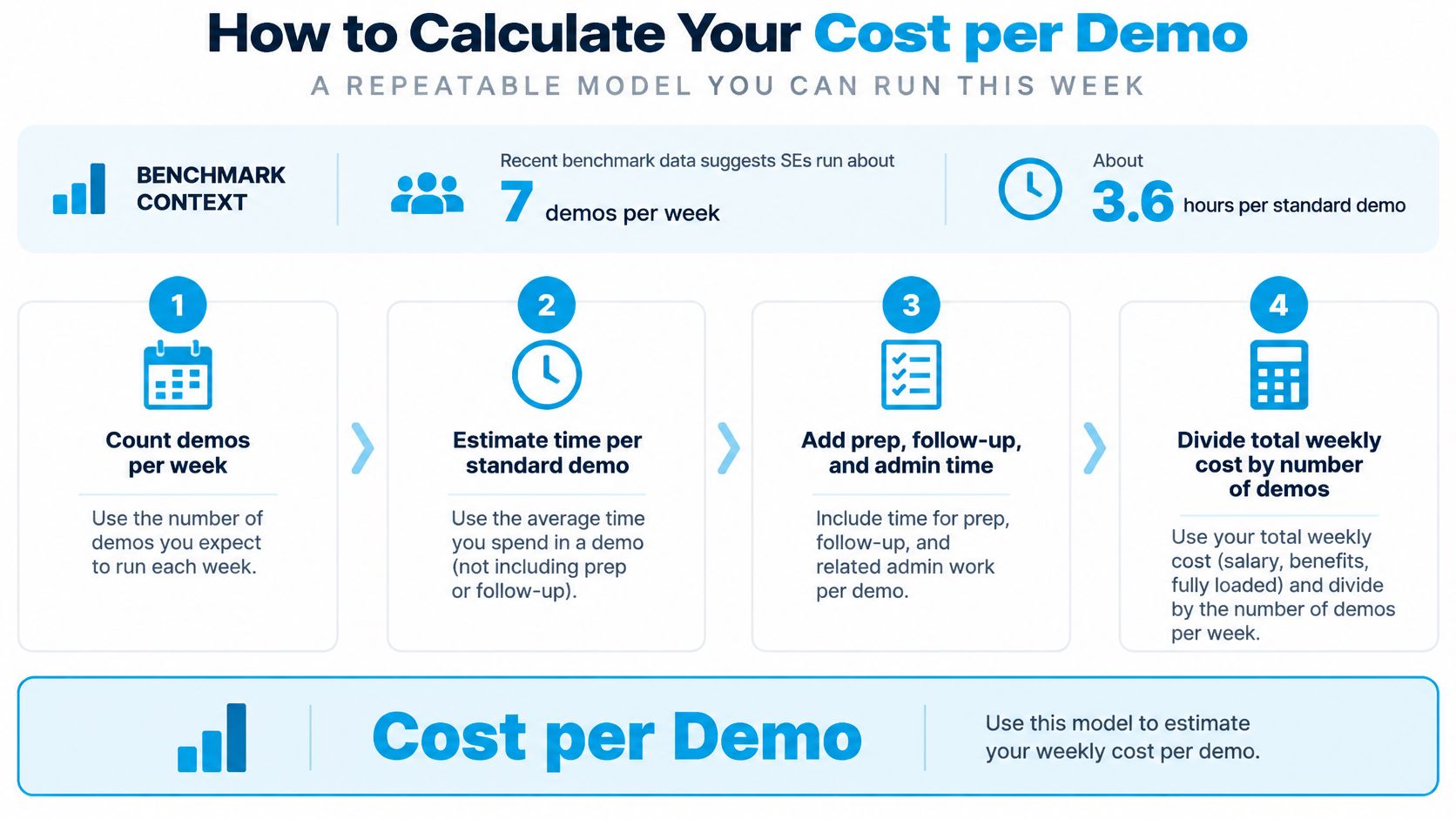
For context, recent benchmark data indicates that sales engineers run about 7 demos per week, with a standard demo requiring approximately 3.6 hours including preparation and a customized demo about 7 hours. That's roughly 25 hours a week for standard demos, or nearly 50 hours if all demos are customized, before discovery, follow-up, solution architecture, security reviews, or proof-of-concept work. If your team looks like that second case, you don't have a demo problem. You have a capacity problem.
The Seven Step Calculation
- Pull a fully loaded hourly rate for each role in the demo, including SE, AE, and any specialist.
- Log minutes per demo by role for preparation, live delivery, follow-up, and internal alignment.
- Count demos per month and the share that is customized.
- Multiply hours by rate to get cost per demo.
- Track the share of demos that reach an agreed next step.
- Divide total cost by advanced opportunities to get cost per advanced opportunity.
- Divide total cost by closed deals to get cost per closed deal.
Don't stop at cost per demo. That number rewards cheap, generic sessions that create clarification work later. Cost per advanced opportunity is the number that tells you whether SE time moved a buying decision. Cost per closed deal then shows what your demo motion adds to acquisition cost.
The short video below walks through the same logic in a deal context, which helps when you need an AE to see why qualification comes before customization.
A Hypothetical Worked Example
All scenarios below are hypothetical. They use a $100 loaded hourly rate, and the AE is assumed at the same loaded rate.
| Scenario (hypothetical) | Hours per demo | Cost per demo |
|---|---|---|
| Standard demo, SE only | 3.6 | $360 |
| Standard demo, SE plus 1 hour AE follow-up | 4.6 | $460 |
| Customized demo, SE only | 7 | $700 |
Now apply a hypothetical 30% advance rate. A standard SE-only demo at $360 divided by 0.30 gives $1,200 per advanced opportunity. If, also hypothetically, one in four advanced opportunities closes, your cost per closed deal is $4,800 from demo labor alone. A customized demo at the same advance rate costs about $2,333 per advanced opportunity, so customization has to raise the advance rate or win rate enough to justify itself.
That's the argument to take into deal reviews. State what the demo cost, what it moved, and what the deal is worth. The Academy teaches ROI calculators and business cases that reduce discounting by up to 7%, and this is where that skill pays off inside your own team first. Pair the cost math with your technical win rate so you're not optimizing spend without tracking whether SE involvement wins. And read the warning in why hours saved aren't money saved in PreSales before you claim savings from shaving minutes. Freed minutes only matter if they go to higher value deals.
Why Demo Assets Cost More Than the Software
Reusable demos and demo environments behave like internal products. You build them, ship changes against them, and pay upkeep whether you budget for it or not. Most of that cost is labor, which is why teams miss it.
Build and Upkeep Effort by Asset Type
| Asset | Build effort | Upkeep |
|---|---|---|
| Reusable interactive demo, one product area | 10-30 hours | 2-6 hours per month for weekly-shipping products |
| Four to six demos, year one | 120-180 hours total | Included in upkeep |
Those figures come from one industry estimate on interactive product demos, which places initial build effort at 10–30 hours, ongoing maintenance at 2–6 hours per month per demo for products shipping weekly, and first-year internal time for four to six demos at roughly 120–180 hours, excluding software. Treat them as planning ranges, then replace them with your own logged hours.
Release velocity is the driver. Every release can stale your seeded data, workflows, screenshots, and scripts. If nobody updates the asset, the cost doesn't vanish. It shows up as a broken demo in front of a buyer, lost credibility in the room, and emergency rework by an SE or product marketer the night before a call.
Calculate total cost of ownership in plain terms. Add license fees, plus build hours, plus monthly upkeep hours multiplied by the owner's loaded rate, plus enablement time and periodic rebuilds. Budget software from vendor quotes separately. The labor line is the one often undercounted, and it's the line that grows with every demo you add. If you're comparing how vendors structure those license and platform charges across categories, it helps to compare hybrid project management pricing as a reminder to separate subscription line items from the internal work needed to keep a tool useful.
An unowned demo asset is a future emergency fix. Assign the owner before you build it.
Run your demo library like you'd run any enablement asset.
- Version-control every demo so changes are tracked and reversible.
- Name one owner per demo who is accountable for accuracy.
- Test each demo against every major release before a buyer sees it.
- Retire demos whose usage or conversion falls below a threshold you set in advance.
That discipline keeps your sales enablement content honest. A small library of current, owned demos beats a large library of stale assets that SEs stop trusting. When SEs stop trusting the asset, they rebuild one-off versions per deal, and your demo costs climb again through customization you thought you'd eliminated.
When a Proof of Concept Becomes Real Money
A proof of concept isn't a longer demo. Treating it like one is how teams give away weeks of senior technical work without a decision attached.
The comparison below shows the gap in timeline and effort before the cost breakdown.
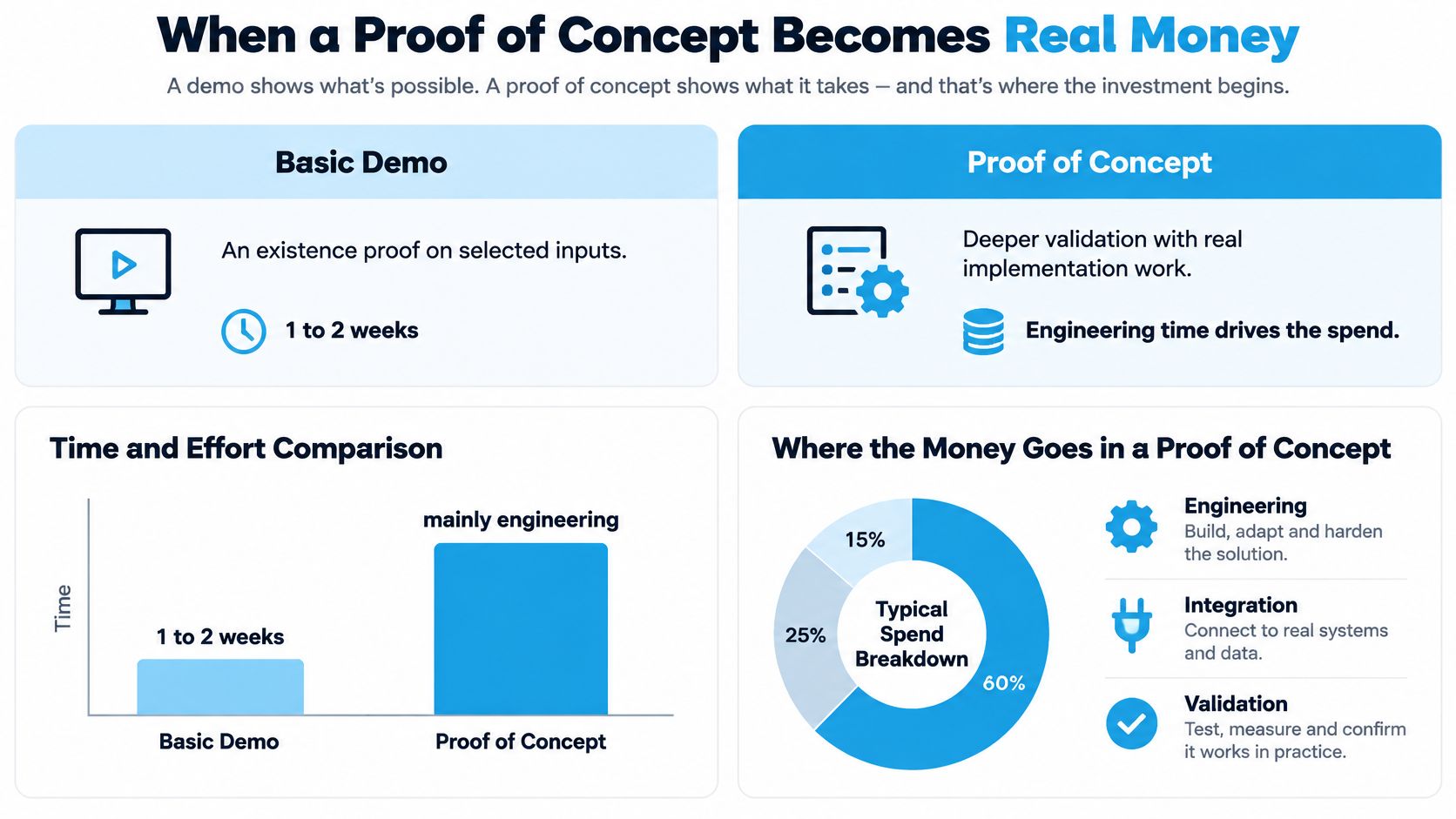
A basic demonstration is an existence proof using selected inputs. A PoC must establish whether a solution works under more realistic conditions, with data preparation, infrastructure, security review, and senior specialist time. A 2026 cost analysis of AI-oriented PoCs estimated a typical engagement at six to eight weeks, with the external invoice representing only about 38% of the true cost. That analysis studied AI-oriented PoCs, so transfer the proportions with care to your own product. The direction still holds. The invoice is a minority of the spend.
Share of Total PoC Cost by Component
| Cost component | Share of total PoC cost | What it covers |
|---|---|---|
| External invoice | about 38% | Vendor fees the buyer sees on the purchase order |
| Internal senior engineering and domain expert time | 26% | Specialist hours that never appear on an invoice |
| Access provisioning and security review | 12% | Accounts, data access and approvals |
| Baseline measurement and label adjudication | 11% | Setting success metrics and reviewing results |
| Carrying cost of stalled decisions | 8% | Cost of waiting while the evaluation drags on |
| Compute, storage and model-API usage | 5% | Infrastructure consumed during the evaluation |
The same analysis notes a demonstration may take one to two weeks and primarily require engineering time. Compare that with six to eight weeks for a PoC and the capacity call becomes clear. When the invoice is about 38% of total cost, a paid PoC can require roughly 2.6 times its external invoice in total economic resources.
Use a hypothetical example to make that concrete. A hypothetical $20,000 invoice at that proportion implies roughly $52,600 in total resources. That is hypothetical arithmetic from the proportion, not a quote for your next evaluation. It tells you why a modest looking PoC still deserves a hard gate.
Say yes only when you have a late-stage deal, a decision the buyer has named, defined success metrics, real data access, a time box, and a named owner on each side. Write those terms into a proof of concept plan before work starts. Say no when the buyer won't name a decision date. Without a date, you don't have an evaluation. You have open-ended unpaid custom work.
Cut Demo Costs and Set the Next Step
Stop demoing deals that have no named decision. That's the position. Everything below supports it, and it starts with the rule you already know. No discovery, no demo.
Five Moves That Cut Cost Without Cutting Quality
- Qualify before any demo. Confirm the decision, the stakeholders, and the technical risk first. Use a structured check such as MEDDPICC for Solution Engineers so the AE and SE agree on what makes this deal real before anyone builds anything.
- Build focused demos. The Academy's Demo module teaches focused 15-minute demos with 3 features that address the customer's exact problem, instead of 40-minute product tours. Three features tied to a named problem beat forty minutes of coverage that nobody asked for.
- Reuse environments and assets, and retire what nobody uses. Reuse is where standard demos stay cheap. Retirement matters too, because dead assets still attract maintenance questions and confuse new SEs about what's current.
- Match format to the deal. Use self-guided or recorded demos for low-complexity, single-buyer deals. Use live sessions for multi-stakeholder reviews where questions differ by department. Reserve a proof of concept for late-stage, tightly scoped validation with a decision attached.
- Pressure-test ROI assumptions against the actual funnel before committing SE hours. In the free discovery call, the team pressure-tests the assumptions in the ROI calculation against the customer's actual funnel. Apply that same discipline internally. If the funnel math doesn't support the SE hours, shrink the demo or walk away.
A shorter demo isn't automatically cheaper. A generic short demo creates clarification and rework later, because buyers still need their questions answered and they'll get those answers through follow-up calls your SE has to staff. Judge every format by cost per advanced opportunity, not minutes presented. Minutes are easy to cut. Advanced opportunities are what pay for the team.
The Four Item Gate Before Booking
Run this check on every demo request. If you need the discovery discipline behind it, work through the discovery call guide with your AE partners so you're asking the same questions the same way.
- Named decision-maker and full attendee list, with the question each person owns.
- The decision or gate the session must advance.
- The evidence the buying group still lacks.
- An agreed next step with a date.
If any item is missing, the demo waits or shrinks to a scoped session with a narrower question. Don't fill the gap with a bigger demo. A missing decision-maker won't appear because you added slides. Missing evidence won't clarify itself because you booked an hour instead of thirty minutes.
Gate rule: If the buyer can't name the decision, you can't name the demo. Shrink the ask until both are clear.
Review the motion once a quarter. Compare cost per advanced opportunity against your calculation model by format, segment, and SE, then drop any format that doesn't pay back. Keep the formats that advance deals at a defensible cost, even if they take longer per session. A live demo that advances a multi-stakeholder deal is cheaper than three short demos that advance nothing.
Do one thing this week. Run the four-item check on the next demo request that lands in your inbox, before you touch an environment. If you want an outside view on the math, a free discovery call costs nothing and carries no commitment, and it's a practical way to test your ROI assumptions against your funnel. Teams that want this habit across the whole SE team can look at the Trusted Advisor Academy for structured practice on discovery, demos, and evaluation management tied to active deals.
Cutting your demo costs starts with better discovery, tighter qualification, and demos built around a named decision, and PreSales Unleashed GmbH trains Solution Engineers and PreSales leaders to run exactly that motion through the Trusted Advisor Academy. If you want your team spending SE hours only where they can earn the technical win, visit PreSales Unleashed GmbH and book a free discovery call to pressure-test your current demo spend against your funnel.